
Keep each source visible
Pick notes for one course objective. In the combined reading view, each original note stays in its own section, so you can trace an idea back to its source.
One course topic can appear in a lecture outline, a reading note, and a feedback note. Reading each file alone can hide gaps or repeated ideas. This guide gives you a simple way to choose related notes, compare what each source says, and decide between reading, saved-card review, and a new study set. Keep clinical details tied to your approved course sources.
This guide describes the released web app. The button opens the app root. Sign in and choose Study multiple notes in Library.
Pick notes for one course objective. In the combined reading view, each original note stays in its own section, so you can trace an idea back to its source.
Use existing-card review when your notes already have useful cards. Choose new generation only when a shared study set would test relationships across the selected notes.
A generated card or question can repeat an error from a source. Compare its wording and answer with your permitted material before you rely on it.
What this guide gives you
Use a three-source comparison checklist and a choice guide. You can read selected notes together, review cards you already have, or create a new set when you need fresh prompts.
What the app creates
Web app controls
Step by step
Write one course objective at the top of your study plan. Choose only notes that help answer it. Leave unrelated topics for another session.
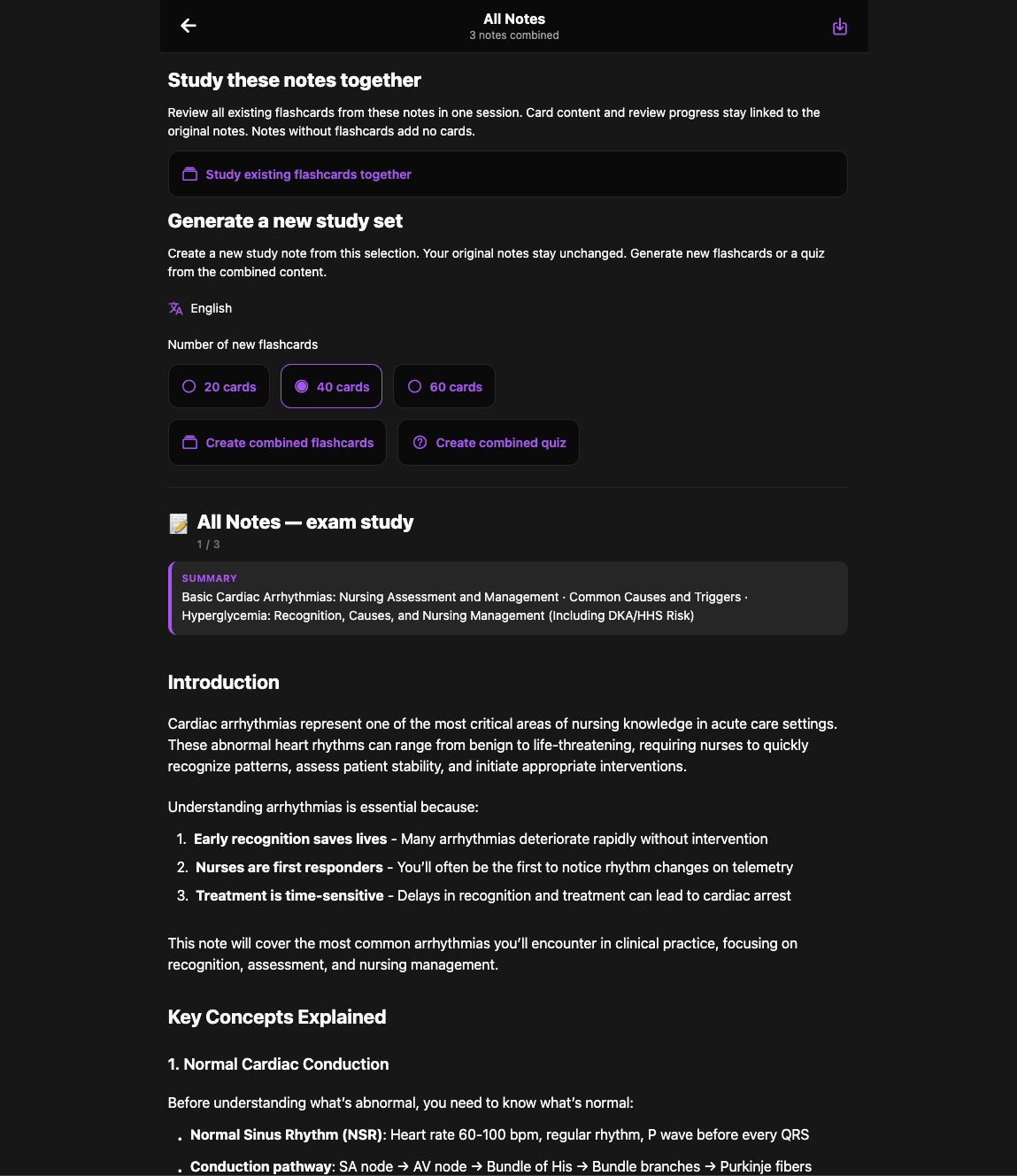
In the web app, choose Study multiple notes. Select the notes you want, then use Study selected notes to open their combined reading view.
Read each source section. Write a short list of ideas that repeat, ideas that differ, and questions that need a check in your course material.
Review existing cards together if they already test the objective. For new cards, choose 20, 40, or 60, or create a quiz. Check every generated item.
Original fictional example
A fictional course unit has three notes: a lecture outline, a glossary from an assigned reading, and instructor feedback on a class exercise. They contain no patient information.
This example supplies a study structure. It contains no medical facts or patient-care instructions.
Quality checks
Read selected notes together to compare them. New flashcards or a quiz create a private study note from the selection; your original notes remain unchanged.
A new combined set needs permission to create a note. Existing-card review reads cards from the original notes without creating a new set.
Use permitted course sources and fictional examples. Do not upload patient information or private clinical documents.
Yes. In the released web app, select Study multiple notes in Library, choose your notes, and select Study selected notes. The reading view keeps the original sections visible.
No. Study existing flashcards together reviews saved cards from the selected original notes. It does not copy or merge those cards.
They are choices for the number of new combined flashcards. They do not set a quiz question count. The screenshot shows 40 selected, not 40 cards already made.
No. The released web flow creates a separate private study note for new flashcards or a quiz. Note creation has account limits.
No. This guide supports course study only. Check generated clinical details against approved sources and follow clinical policies for patient care.
Continue studying
Published . Updated .
Open Feynman Nurse, choose permitted course material, and verify generated study content before repeated review.